
Registration & Verification
Binance Face Verification Keeps Failing: Causes and Fixes
Liveness and face-match checks fail for a small number of repeatable reasons — camera access, lighting, motion, and mismatch against your ID photo. Here is how to tell them apart.
The check is doing two different jobs
A face verification step is really two tests stacked on top of each other, and knowing which one you are failing tells you what to change.
The first is a liveness test: is there a real, present human in front of the camera, rather than a photograph, a video replay or a mask. The second is a match test: does that human's face correspond to the photo on the identity document already on file.
They fail differently. Liveness failures happen during the capture — the screen keeps prompting you, the countdown restarts, nothing gets submitted. Match failures happen after the capture — the recording completes, you see a processing state, and then it comes back negative. Watch which one you are getting.
When it fails before capturing anything
If the camera never really engages, this is a device problem rather than an identity problem.
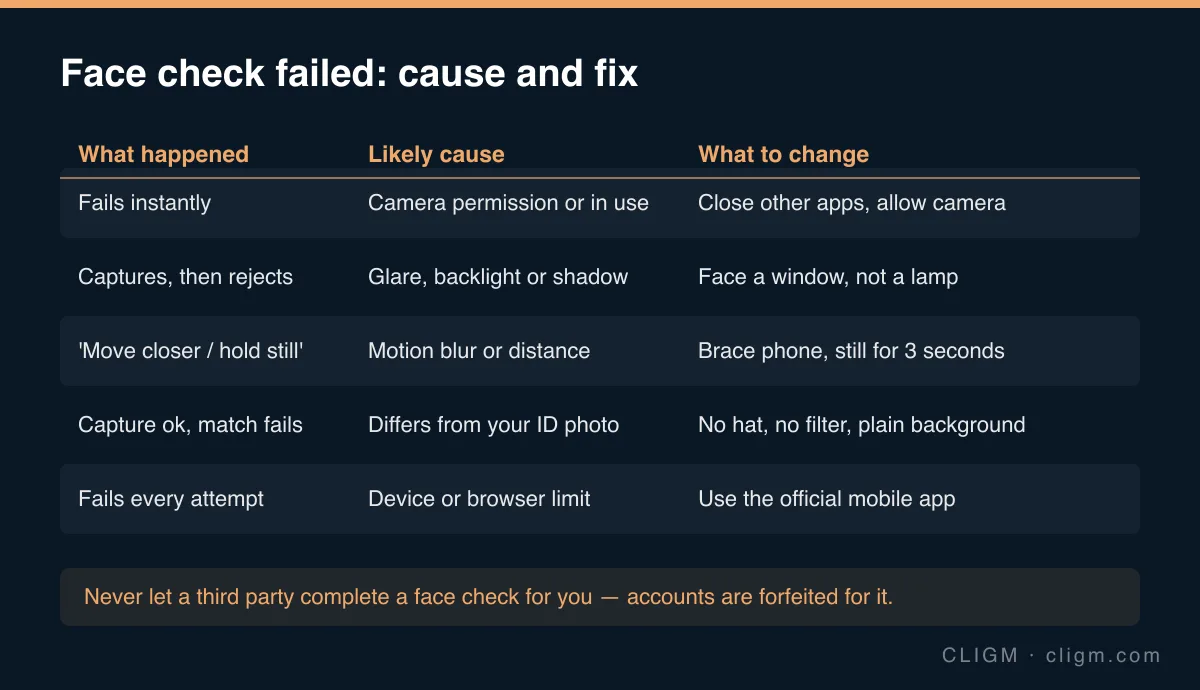
Another application holding the camera is the most frequent cause — a video call, a camera app left open in the background, a browser tab that already requested camera access. Close them fully, not just to the background.
Check that the app or browser actually has camera permission in your device settings. A permission that was denied once often stays denied silently, and the verification screen may simply appear frozen rather than telling you why.
If you are attempting this in a desktop browser, switch to the official mobile app. Mobile cameras, and the app's own capture pipeline, handle these checks far more reliably than a laptop webcam through a browser. Privacy extensions and VPN software can also interfere with the capture stream.
When capture works but the check fails
Now you are looking at lighting, motion and appearance.
Lighting is the biggest single factor. Face a window, with the light in front of you. Sitting with a bright window or lamp behind you puts your face in silhouette, and the system cannot extract usable detail from a dark face against a blown-out background. Overhead lighting directly above you produces heavy eye-socket shadow, which is nearly as bad. Even, frontal, indirect daylight works best.
Motion blur defeats the capture more often than people expect. Brace your elbows against a desk or hold the phone with both hands. Keep it at roughly arm's length — too close distorts facial proportions, too far leaves too few pixels. When it asks you to hold still, hold genuinely still for a full three seconds rather than approximately still.
Appearance matters for the match specifically. Remove hats, sunglasses and anything that shadows the face. Clear glasses are usually fine but can create reflections — take them off if you fail repeatedly. Keep a neutral expression, close to the one in your ID photo. Turn off every camera filter and beauty mode; phones increasingly apply skin smoothing by default, and smoothing removes exactly the fine detail a face match relies on. Use a plain background.
If your appearance has genuinely changed a great deal since the ID photo was taken — significant weight change, a full beard, years of ageing — the match may legitimately struggle. That is a case for official support rather than a fortieth attempt.
The mistake that ends accounts
Never let anyone else complete a face check on your behalf, and never pay a service that offers to pass verification for you.
This is not a grey area or a minor rule. The account is then verified to a face that is not yours, which makes every subsequent security check unpassable and makes recovery impossible when something goes wrong. It is also precisely the pattern that "verification help" scams are built around: they capture your documents, your credentials and your face data in one transaction. The same logic runs through most Binance-related phishing — anyone offering to move you past an official check faster is not helping you.
After several clean attempts
Deliberate repeated failures can trigger a temporary cooldown, which is a security feature and not a punishment. If you have genuinely fixed the lighting, the device and the appearance factors and it still fails, stop attempting and contact official support through the app, describing what you have already tried.
If the capture succeeded and the status simply will not move, the problem is queueing rather than capture — see KYC stuck on "under review". And if the whole verification came back rejected rather than just the face step, start with the document checklist and the general verification-failed diagnosis.
CLIGM is an independent guide and is not affiliated with Binance. Verification requirements, accepted documents and available products differ by region and change over time — always confirm the current rules inside your own account or in official Binance support material. Last reviewed: August 2026.