
Account Security
Fake Binance Emails, Sites and 'Support': A Field Guide to Phishing
Phishing does not look like phishing when it arrives — it looks like an urgent security alert, a helpful support agent, a giveaway. Learn the five channels and the one check that works in each.
Nobody falls for phishing that looks like phishing. The versions that work look like an urgent security alert from Binance, a support agent who found your complaint within minutes, a login page pixel-identical to the real one. The defense is not vigilance in general — it is knowing, for each channel, the one check that fakes cannot pass. This guide goes channel by channel.
One mental model first. Real Binance communication has a defining property: it meets you inside things you initiated — the app you installed, the site you typed, the account you logged into. Phishing has the opposite property: it initiates contact with you and needs you to act fast. Almost every check below is a version of this asymmetry.
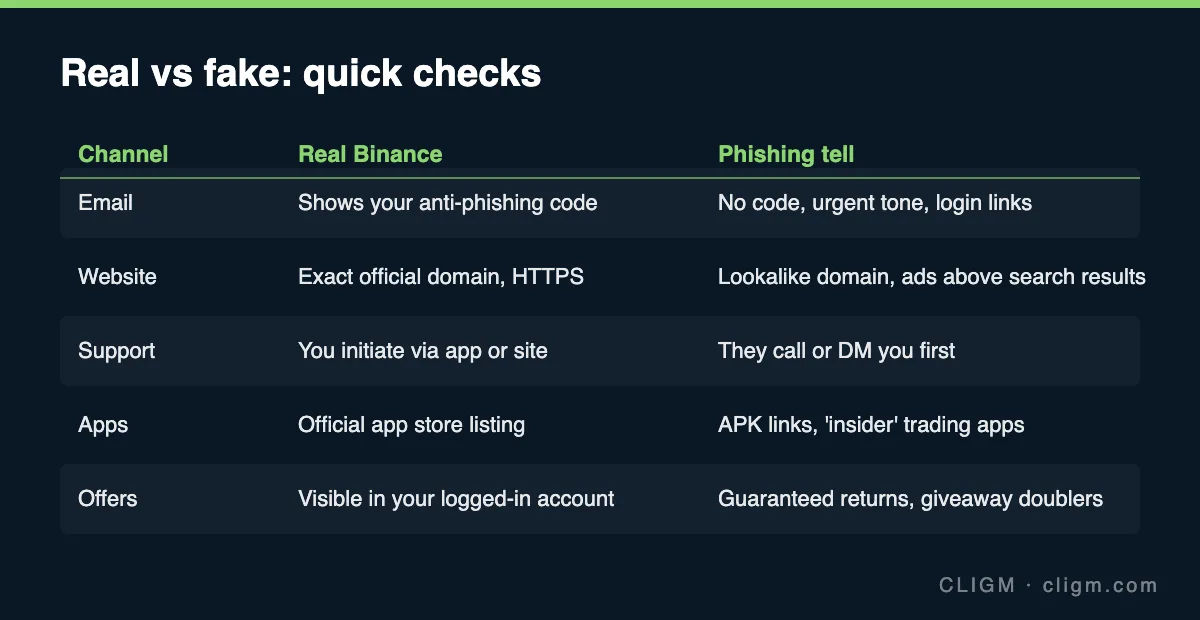
Email: the anti-phishing code is the whole game
Binance lets you set an anti-phishing code — a personal phrase that then appears in every genuine email. After you set it (takes two minutes; part of the 15-minute security checklist), email checking collapses to one rule: no code, not Binance. Scam emails cannot include a phrase they do not know.
Beyond the code: real security emails tell you what happened; phishing emails tell you what to do right now — "verify within 24 hours or your account will be frozen" is the signature move. Sender addresses can be spoofed, so a legitimate-looking sender proves nothing; a wrong sender, however, is disqualifying. And the universal rule regardless of how real an email looks: never log in through an email link. Open the app or type the address yourself. This one habit defeats email phishing completely, even on the days you are tired and rushed.
Websites: the domain, and how you got there
Fake Binance sites live in two places: search ads (paying to sit above the real result for "binance login") and sent links (messages, forum replies, QR codes). The checks: read the domain character by character — lookalikes swap letters, add hyphens, or use different endings; confirm HTTPS; and most importantly, audit how you arrived. Typed it yourself or used your own old bookmark: fine. Arrived via ad or someone's link: assume hostile until proven otherwise. The lowest-effort defense is to bookmark the real site once and only ever use the bookmark. If a login page rejects a password you know is right, be suspicious in the other direction too — harvest pages fail logins on purpose, as covered in the login troubleshooting guide.
"Support": real support never finds you
The cruelest channel. You post a complaint — locked account, stuck withdrawal — anywhere public, and within minutes "Binance Support" replies asking you to DM. The check is structural, not cosmetic: real support exists only inside the official app and website, and only when you go to it. No legitimate exchange employee will ever DM you first on Telegram, X, WhatsApp, Discord or Reddit — this is true regardless of the account's name, badge, follower count, or how accurately it describes your problem (it read your public post, that is all).
Fake support's script is stable: create urgency, then ask for one of — your password, a verification code, your seed phrase, a remote-desktop session, or a "verification payment". Real support needs none of these, ever. A code someone convinces you to read aloud is an account takeover in progress.
Apps: only the official store listing
Fake trading apps arrive as APK download links, TestFlight invites, or "exclusive versions" pitched by an online "mentor" — often paired with a romance or investment-coaching story (the classic pig-butchering setup: the app shows fake profits until you try to withdraw). The check: install only from your platform's official app store, from the listing linked inside the real website. No legitimate exchange distributes its app through chat messages.
Offers: if it finds you, it is bait
Giveaway doublers ("send 1, receive 2 back"), fake airdrops requiring a "claim fee", guaranteed-return investment pools run by "Binance staff", jobs that require you to fund an account first. One filter handles all of them: real promotions appear inside your logged-in account, not in DMs, comments or forwarded messages. Anything that guarantees returns is a scam by definition; anything requiring upfront payment to receive money is the oldest scam there is.
If you already clicked, typed, or shared
Speed matters more than shame — act in this order:
- Typed your password somewhere fake: change it immediately from a clean device — Binance first, then anywhere else that shares it. Expect and welcome the withdrawal cooldown this may trigger.
- Shared a 2FA code or approved a strange prompt: treat the account as actively compromised — change password, revoke sessions and devices, check API keys and withdrawal settings, and contact official support about a possible takeover.
- Installed a fake app or gave remote access: disconnect the device from the internet, remove the software, change all passwords from a different device, and audit everything the compromised device touched.
- Sent money to a scam: record everything (addresses, TXIDs, chat logs), report through official support and to police. Then guard against round two: "recovery services" that contact victims are the same industry — as explained in the wrong-network recovery guide, nobody can reverse on-chain transactions for a fee.
If compromise reaches the point of a locked account, the recovery paths in account locked or suspended take over from here.
CLIGM is an independent site and is not affiliated with Binance. Scam patterns evolve constantly — treat the structural checks (who initiated contact, where the conversation lives, what is being asked of you) as the durable layer, not any specific example. Last reviewed: July 27, 2026.