
Account Security
Lost Your Binance Authenticator? How to Reset 2FA Step by Step
Lost your phone or authenticator app? Here is the official Binance 2FA reset path, what the security hold afterwards means, and the scams to avoid on the way.
Losing access to your authenticator — a dead phone, a factory reset, a deleted app — feels like being locked out of your own money. The good news: Binance has an official self-service path for exactly this situation, and it works. The bad news: the panic this moment creates is precisely what scammers monetize. This guide walks the official route step by step, explains why the process is deliberately slow in places, and flags every point where people get robbed while trying to get back in.
One principle before we start: the only place a 2FA reset happens is inside the official Binance app or website. Not in a Telegram chat, not through a "recovery agent", not via a link someone helpfully sends you. Anyone offering to speed this up for money is the threat you enabled 2FA to stop.
Step 0: check for backup codes first
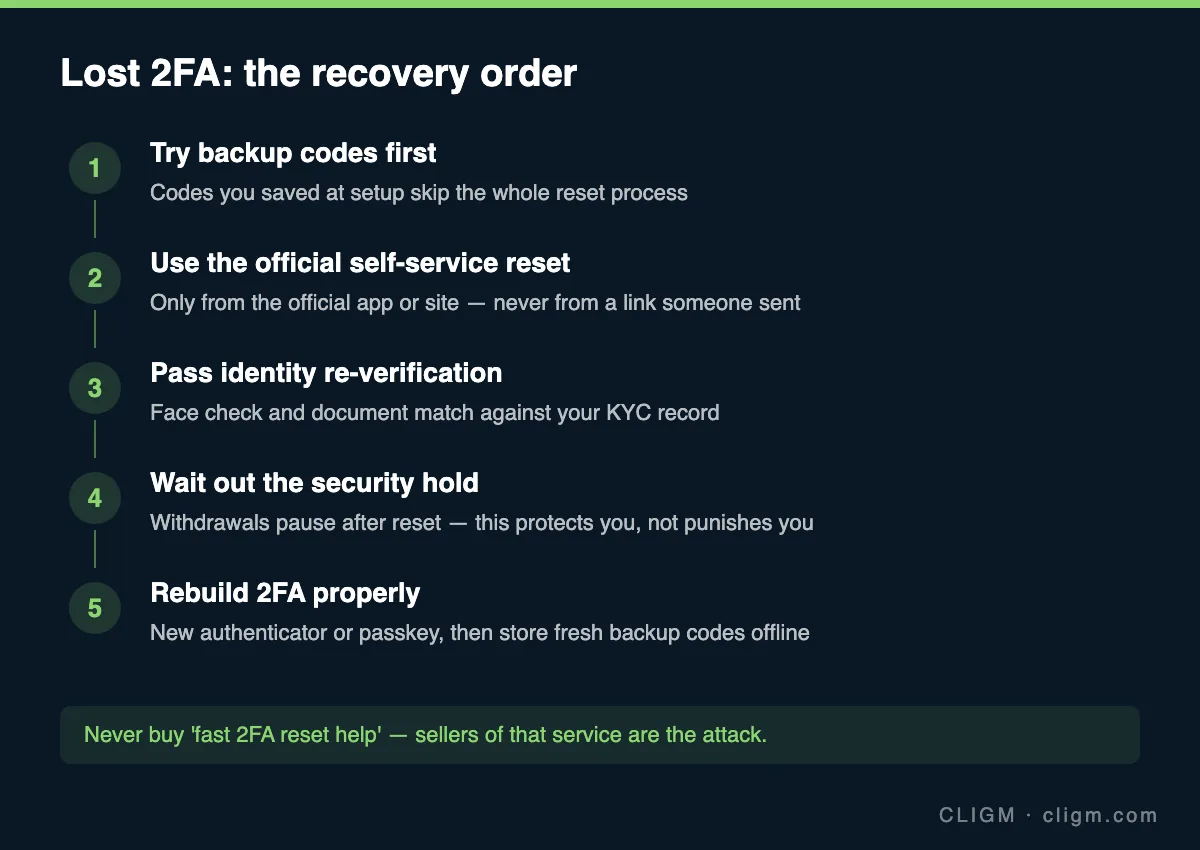
When you first enabled your authenticator, you were shown backup (recovery) codes and told to save them. If you did — in a password manager, on paper, anywhere — you can use one now to log in and bind a new authenticator in minutes, skipping the entire reset process. Check before doing anything else. This is also the lesson to carry forward: at the end of this process, store the new codes somewhere that survives a lost phone.
If your authenticator app itself supports cloud backup or multi-device sync (some do), installing it on a new device may restore your codes directly. Try that too before a formal reset.
Step 1: start the reset from the official app or site
Type the official Binance address yourself or open the official app, tap through to login, and after entering your password look for the option along the lines of "Security verification unavailable?" on the 2FA prompt. That link starts the official reset flow. Two rules here:
- Never search "binance 2fa reset" and click an ad. Phishing pages that imitate the reset flow exist specifically to harvest your password and documents.
- Never hand the process to a third party. There is no VIP lane. Sellers of "fast resets" either phish you or social-engineer support in your name — both can end with your account frozen or emptied.
Step 2: identity re-verification
Binance needs to be sure the person removing 2FA is the account owner and not an attacker — the entire security of the reset depends on this step being strict. Expect some combination of: document photos matching your original KYC record, a live face check, and security questions about account activity. Do it yourself, in good light, with the same identity documents you verified with. If your KYC details have changed since (new passport, legal name change), expect extra review time and have both documents ready.
If your verification attempt fails, the causes are usually the same ones that fail first-time KYC — blurry images, cropped edges, mismatched names. Our guide to why verification fails applies here in full.
Step 3: the security hold is a feature
After a successful 2FA reset, withdrawals are typically paused for a fixed period. People experience this as punishment — it is the opposite. The most common reason an account's 2FA gets reset is an attacker who has taken over the email and wants to drain funds. The hold exists so that the real owner has time to notice and object. During the hold: your funds sit where they are, trading may still work, and no amount of support tickets shortens the timer. Plan around it rather than fighting it — and treat any "service" claiming to lift holds early as a scam by definition.
What the different pending states mean during and after this window is covered in withdrawal pending or suspended.
Step 4: rebuild your 2FA properly
Once you are back in, do not just re-enable the same setup and move on. Take ten minutes:
- Bind a new authenticator or, better, a passkey. Passkeys and hardware-backed options resist phishing better than codes.
- Save the new backup codes offline — paper or a password manager, not a screenshot in your camera roll that syncs to the cloud an attacker may reach.
- Check your account while you are there. Review authorized devices, API keys, and withdrawal whitelist settings for anything you do not recognize. If the 2FA loss coincided with a phone theft, assume the thief saw your notifications and act accordingly.
- Re-check your email security. Your email can reset almost everything else; it deserves its own strong password and 2FA.
The full sequence, with time boxes, is in the 15-minute security checklist.
The scams that orbit this exact moment
Because "locked out of 2FA" is a desperate, searchable moment, it has its own scam ecosystem. The patterns to refuse on sight:
- Fake support accounts replying to your public complaint on X/Telegram/Reddit within minutes, asking you to DM. Real support does not patrol social media DMs.
- "Recovery services" charging upfront fees to "escalate" your case. There is no escalation for sale.
- Screen-sharing "help" — anyone asking you to install AnyDesk/TeamViewer during a reset is stealing your session.
- Seed-phrase requests. A 2FA reset never, under any circumstances, requires a wallet seed phrase, private key, or your full password spoken aloud.
If you still have your old device
A quieter scenario: you are switching phones and the authenticator is still working on the old one. Then you do not need a reset at all — log in normally, go to security settings, and change/rebind the authenticator to the new device while the old one can still approve the action. Do this before wiping the old phone, and the entire article above becomes unnecessary.
CLIGM is an independent site and is not affiliated with Binance. Reset flows, verification requirements and hold durations vary by account and region and change over time — treat the official app's instructions as authoritative. Last reviewed: July 27, 2026.