
Deposits & Withdrawals
Binance Withdrawal Pending or Suspended: What Each Status Means
Distinguish internal review, processing, on-chain confirmation and suspension when a Binance withdrawal does not arrive.
When a Binance withdrawal does not arrive, the single most useful piece of information is the status label attached to it — because each status points to a different place in the pipeline, a different party responsible, and a different action you can take. This guide decodes each stage in order, so you can stop refreshing and start checking the one thing that actually matters for your case.
A withdrawal passes through distinct hands: your own approvals, Binance's internal processing, the blockchain itself, and finally the receiving platform's crediting rules. The status tells you whose hands it is in right now.
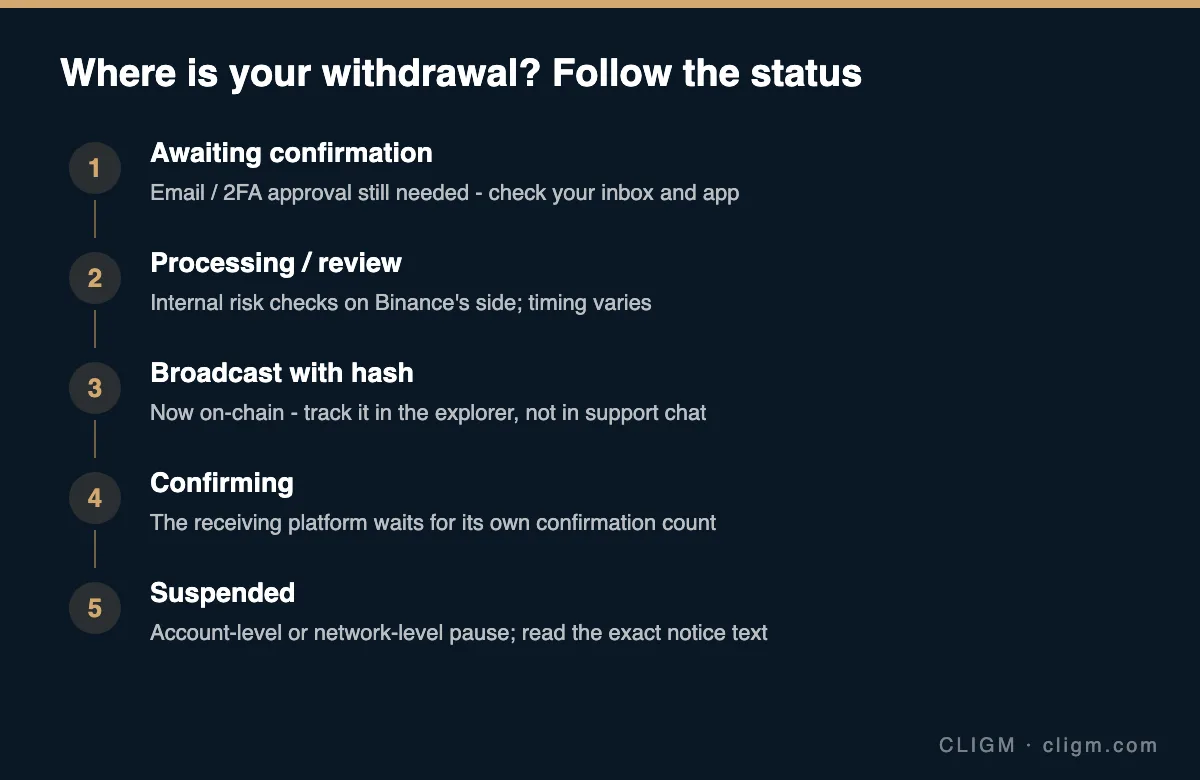
If the withdrawal is awaiting confirmation
The earliest stage is the one most often overlooked: the withdrawal request exists but has not been fully authorized. Check your email — including spam — for a confirmation link, and your authenticator or the app for a pending 2FA approval. Unconfirmed requests expire after a while, and no amount of waiting will move a withdrawal you have not finished approving.
One caution at this stage: a genuine confirmation email is also the template phishing loves to imitate. Verify the email carries your anti-phishing code before clicking anything; if you have not set one up, do it today — it is minute six of our 15-minute security checklist.
If the withdrawal is processing
"Processing" means the request is fully approved and inside Binance's internal pipeline: risk checks, wallet batching, security holds. There is no transaction hash yet because nothing has been broadcast to the blockchain. Timing at this stage varies — most withdrawals clear it quickly, but several situations legitimately extend it:
- Recent security changes. A new 2FA device, a password reset or a new whitelist address typically triggers a withdrawal restriction window. This is protection working as designed.
- Risk review. Unusual amounts, destinations or account activity can route a withdrawal to manual review.
- Wallet maintenance on Binance's side for that specific asset or network, usually visible in official announcements.
If processing exceeds the estimate shown in the app significantly, contact official support through the app. Do not cancel and retry repeatedly — parallel attempts make reviews slower, not faster.
If a transaction hash is available
The moment a hash appears, responsibility shifts to the blockchain, and the explorer replaces support chat as your source of truth. Copy the hash from the withdrawal record and open it in the correct explorer for the network used — typed or bookmarked, never a link someone sends you.
The explorer answers three questions. Did the transaction succeed? How many confirmations does it have? And did it pay a fee appropriate for current network conditions? A confirmed, successful transaction means Binance's part is complete: the funds have left. If the receiving platform has not credited them, the delay is now on that side — most platforms credit only after their own required confirmation count, which can be higher than you expect during network congestion.
If the receiving side shows nothing even after ample confirmations, run the deposit-side diagnosis — network match, address comparison, memo, minimums — exactly as laid out in our guide to diagnosing a missing deposit. And if you suspect the network itself was wrong, the network-matching guide explains what is and is not recoverable.
If withdrawals are suspended
"Suspended" is a different animal from "slow," and the notice text tells you which kind you are facing.
Network-level suspension affects everyone using that asset or network — usually during chain upgrades, congestion events or security incidents — and appears in official announcements. Nothing about your account is wrong; wait for the network to reopen, or withdraw via a different supported network if you have verified the receiver supports it too.
Account-level suspension applies to you specifically: triggered by security changes (the cool-down after a new device or password), by an ongoing compliance or risk review, or by incomplete verification requirements. Read the exact wording in the app, complete whatever it asks through official channels, and expect time-based holds to simply expire. What you should not do is try to circumvent a hold — through a different product, a rushed P2P trade, or a "helper" who contacts you. Holds exist disproportionately to stop fraud in progress, including fraud against you.
Information to prepare before contacting support
When a case genuinely needs support — processing far beyond estimates, a suspension without a stated reason, a confirmed transaction the receiver denies — prepare a factual packet first: withdrawal ID, asset, network, amount, destination address, memo if any, transaction hash if one exists, timestamps and the exact status text. Submit through the official app or website. Cases with complete packets resolve in a fraction of the time, because the first three support replies are otherwise spent collecting exactly these details.
Scam warning
Stuck withdrawals attract predators with uncanny speed, especially if you mention the problem publicly. The patterns are constant: fake "support" reaching out first on Telegram or WhatsApp; "recovery services" demanding an upfront fee to unstick a transaction (impossible — confirmed transactions cannot be modified by anyone); phishing emails offering a "cancel withdrawal" button; and instructions to install remote-access software. Real support never initiates contact, never asks for your password or 2FA codes, and works inside the official ticket system only.
Prevention checklist
A few habits make withdrawal problems rare and small: verify address and network from the receiving platform's current deposit page every time; send a test amount first when the sum matters; enable the address whitelist so new destinations require verification and delay; avoid making security changes right before a planned withdrawal, since the cool-down will apply; and check official announcements for network maintenance before large transfers. If you are withdrawing to sell for fiat rather than moving crypto, the costs and routes differ — see how to withdraw from Binance to a bank account for that path.
CLIGM is an independent publication, not affiliated with Binance. Status names, hold durations and policies vary by region and change over time — the in-app withdrawal record and official announcements are the authority. Last reviewed: July 27, 2026.