
Deposits & Withdrawals
How to Withdraw Money from Binance to a Bank Account (2026): Routes, Fees, Timelines
Three working routes to move money from Binance to your bank in 2026: direct fiat withdrawal (SEPA and other rails), P2P selling, and transferring to a licensed local exchange. Step-by-step instructions, verified SEPA fees, arrival times, and fixes for pending or rejected withdrawals.
Short answer: there are exactly three ways to get money out of Binance and into a bank account in 2026, and the right one depends almost entirely on where you live.
- Direct fiat withdrawal — sell your crypto for a supported fiat currency (EUR, GBP, and others) on Binance, then withdraw the fiat balance to your own bank account through a channel such as SEPA. This is the cleanest route if your local currency is supported.
- P2P (C2C) selling — sell crypto directly to a vetted buyer on Binance P2P and receive a bank transfer from them. Available in some regions, with important safety rules.
- Withdraw crypto to a licensed local exchange — send your crypto (typically USDT or USDC) to a regulated exchange in your own country, sell it there for local currency, and withdraw to your bank. This is the standard route where Binance has no fiat gateway for your currency — Taiwan is the classic example, since Binance does not support TWD deposits or withdrawals at all.
One trap to avoid before anything else: Binance Convert cannot turn crypto into withdrawable fiat. Convert is crypto-to-crypto only. To get a real EUR or GBP fiat balance you must use Sell or a spot trading pair (e.g. BTC/EUR), and only then withdraw through the bank channel.
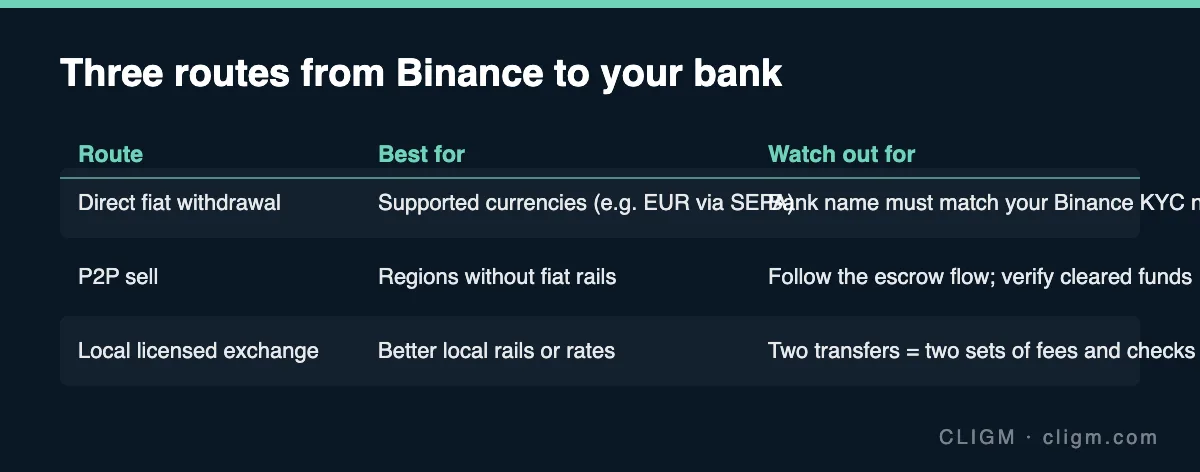
Which route should you use? (By region)
| Your situation | Route 1: Fiat withdrawal | Route 2: P2P selling | Route 3: Local exchange |
|---|---|---|---|
| Eurozone / SEPA countries (36 supported) | Yes — SEPA, primary route | Available | Rarely needed |
| Netherlands | No — SEPA withdrawal not available | Check local availability | Possible fallback |
| UK and other supported fiat currencies | Yes — via the listed bank channels | Available in some regions | Rarely needed |
| Taiwan (no TWD support on Binance) | No | Restricted — registered merchants only, T+1 | Yes — main route (MAX / BitoPro) |
| Regions with no Binance fiat channel | No | If offered locally | Yes — main route |
If Route 1 is open to you, use it: it keeps everything inside regulated rails, in your own name, with a clear paper trail. Fall back to Route 2 or 3 only when Route 1 is unavailable for your currency.
Route 1: Direct fiat withdrawal (SEPA example)
This is a two-stage process: first turn crypto into fiat, then move fiat to your bank.
Stage 1 — Sell crypto for fiat
- Open the Sell flow (or a spot pair like BTC/EUR) and sell your crypto for the fiat currency you want to withdraw. Remember: Convert will not work here — it only swaps between cryptocurrencies and cannot produce a fiat balance.
- The proceeds land in your fiat wallet (e.g. EUR balance).
EEA users, one extra step first. Since 31 March 2025, USDT spot trading pairs have been delisted for EEA users under MiCA compliance. You can still hold, deposit, withdraw, and Convert USDT — but you cannot sell it directly for EUR on spot. If your funds are in USDT, first Convert to a compliant asset such as USDC (or directly into a sellable position), then sell for EUR.
Stage 2 — Withdraw fiat via SEPA
- Go to Fiat and Spot → Withdraw → EUR, choose Bank Transfer (SEPA).
- Enter the IBAN of a bank account held in your own name — exactly matching your Binance KYC name. Joint accounts are not accepted, and third-party accounts will be rejected.
- Confirm with 2FA and submit.
SEPA fees and limits (verified July 2026)
| Item | Value |
|---|---|
| SEPA withdrawal fee | Typically 1 EUR per transaction (promotions can reduce it to 0; note the EEA SEPA Instant zero-fee campaign that started in Nov 2025 ended on 4 March 2026) |
| Minimum withdrawal | 2 EUR |
| SEPA Instant arrival | Up to 24 hours |
| Regular SEPA arrival | Up to 3 business days |
| Typical processing window | 1–3 business days overall |
| Supported countries | 36 SEPA countries — but not the Netherlands, where SEPA withdrawal is unavailable |
Whether your withdrawal goes out as SEPA Instant or regular SEPA depends on your bank's participation in the instant scheme. For the current fee shown at the moment you withdraw, always trust the number displayed on the withdrawal screen — Binance's official SEPA bank transfer FAQ is the reference page. Fees for other fiat channels (GBP, and other currencies) vary by rail and region; check the live figure on the official withdrawal page rather than any third-party table.
Route 2: Selling via P2P (C2C)
Before your first P2P sale, read our full Binance P2P safety checklist — the release step is where sellers lose money, and the checklist covers it in detail.
Where Binance P2P is available, you can sell crypto directly to another user and receive the payment straight into your bank account. It can be fast and fee-light, but the safety burden is on you.
Key rules:
- Sell only through the platform's P2P order flow, never in private chats or off-platform "better rate" deals.
- Verify the money before releasing the crypto. Log in to your actual bank account (not an SMS, not a screenshot the buyer sends you) and confirm the funds have genuinely arrived and are not a pending or reversible payment. Only then release.
- The payer's name must match the buyer's verified name on the order. Refuse third-party payments — they are the classic setup for fraud and money-laundering exposure.
- Prefer merchants with high completion rates and long track records; for larger amounts, split into several smaller orders.
- Note that P2P availability and rules differ sharply by region — in Taiwan, for example, only merchants that have completed local anti-money-laundering registration remain, and a T+1 withdrawal rule applies (details in Route 3's context below).
Route 3: Withdraw to a licensed local exchange (Taiwan walkthrough)
Where Binance offers no fiat channel for your currency, the standard pattern is: Binance → crypto withdrawal → local licensed exchange → sell for local currency → bank. Taiwan is the textbook case, because Binance does not support TWD deposits or withdrawals at all.
The Taiwan flow, step by step:
- Open an account at a locally registered exchange — as of June 2026 there are 8 operators that completed Taiwan's legal registration; MAX and BitoPro are the two commonly used ones. (ACE is no longer an option — it has dropped out and should not be used.) Complete identity verification and bind a bank account in your own name; withdrawals are limited to your own verified account.
- Get the deposit address on the local exchange for the asset you're sending — usually USDT, and TRC20 is the commonly used network for its low transfer cost.
- Withdraw from Binance using that address, making absolutely sure the network matches on both sides (TRC20 to TRC20). A wrong-network transfer can mean permanent loss.
- Send a small test amount first — confirm it arrives, then send the rest.
- Sell USDT for TWD on the local exchange's USDT/TWD market.
- Withdraw TWD to your bank. Both MAX and BitoPro charge NT$30 per withdrawal, paid to your own verified bank account.
The same pattern — pick a regulated local venue, send stablecoins on a matching network with a test transaction, sell locally, withdraw — applies in most other countries without a Binance fiat gateway.
Timelines and fees at a glance
The figures below cover this specific withdrawal path; for the full map of Binance cost categories and how to verify each one live, see Binance fees explained.
| Route | Typical cost | Typical arrival time |
|---|---|---|
| SEPA fiat withdrawal | ~1 EUR/transaction (min. withdrawal 2 EUR) | Instant rail: up to 24h; regular: up to 3 business days; overall 1–3 business days |
| P2P selling | Spread priced into the offer; platform-side fees vary | Bank transfer speed between two local accounts — often same day |
| Via local exchange (Taiwan) | On-chain network fee + local trading fee + NT$30/withdrawal | Chain transfer: minutes; local bank payout: per exchange schedule |
All fee figures other than the verified numbers above change over time — treat whatever the official withdrawal screen shows at the moment of the transaction as the truth.
Troubleshooting common withdrawal problems
For status-by-status diagnosis of a crypto withdrawal that has not arrived, see withdrawal pending or suspended; for network selection mistakes, see BEP20 vs ERC20 vs TRC20.
Withdrawal stuck on "pending." Fiat withdrawals legitimately take up to the stated window (SEPA: up to 3 business days for the regular rail), so "pending" within that window is normal. If it exceeds the window, check for a verification request in your Binance messages, confirm your bank details were exact, and contact support with the transaction ID.
Withdrawal bounced back — name mismatch. The single most common rejection cause: the receiving bank account's holder name doesn't exactly match your Binance KYC name, or it's a joint account (not accepted). The funds are returned to your Binance fiat balance; re-submit using an account solely in your legal name, spelled identically to your verification documents.
Withdrawal limit too low. Limits scale with your verification level. Complete the higher KYC tiers to raise them, and for genuinely large amounts, split the withdrawal into several batches across days — this also plays nicer with bank-side monitoring.
Your bank calls to ask about the money. This is routine for crypto-related inflows. Answer honestly — proceeds from selling cryptocurrency on an exchange, in your own name — and keep your Binance transaction records handy as evidence. Honest, documented answers resolve these calls quickly.
Before any withdrawal, do the basic security pass: 2FA enabled, anti-phishing code set, no recent password or device changes triggering withdrawal locks, and records kept of every transaction.
FAQ
Can I withdraw from Binance straight to my bank card or account without selling my crypto? No. Banks receive fiat, not crypto. You must first sell your crypto for a supported fiat currency (via Sell or a spot pair — not Convert), then withdraw the fiat balance. If your currency isn't supported, use P2P or a local exchange.
How long does a Binance SEPA withdrawal take in 2026? SEPA Instant arrives within 24 hours at most; regular SEPA takes up to 3 business days. Plan on 1–3 business days end to end.
Why can't I sell USDT for EUR on Binance in Europe? USDT spot pairs were delisted for EEA users on 31 March 2025 under MiCA rules. You can still hold, deposit, withdraw, and Convert USDT — Convert it to a compliant asset such as USDC or EUR-tradable positions first, then cash out.
Can someone else's bank account receive my Binance withdrawal? No. The account holder name must exactly match your Binance-verified identity, and joint accounts are also rejected. Mismatched withdrawals are returned.
Disclaimer: This guide is for general information only and is not financial, tax, or legal advice. Fees, limits, supported regions, and platform policies change frequently — the figures above were verified as of July 2026, and the amounts shown on Binance's official withdrawal pages and announcements at the time of your transaction always take precedence.