
Deposits & Withdrawals
Binance 'Withdrawal Suspended' by Risk Control: What Triggers It and What to Do
Risk-control holds on withdrawals have specific triggers and predictable durations. Identify which one fired, do the one thing that clears it, and avoid the moves that extend it.
Few messages generate more instant anger than a withdrawal blocked "due to risk control" — it is your money, and a machine just said no. But risk-control holds are not random and not personal: each one has a specific trigger, a predictable duration, and usually exactly one correct response. Identifying which trigger fired is most of the solution; fighting the hold generically is how people extend it.
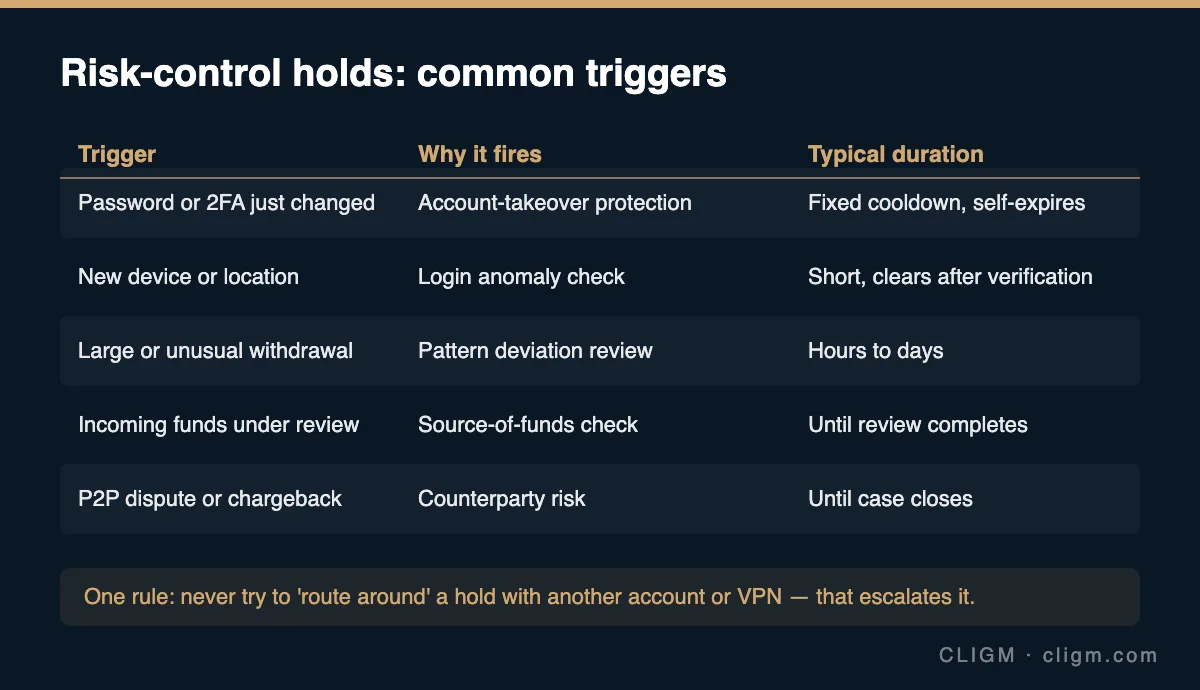
The golden rule up front: a risk-control hold is never cleared by routing around it. Trying a different account, a friend's account, a VPN, or rapid-fire retries reads — to an automated risk system — exactly like an attacker probing for a way out. Every workaround attempt makes the hold longer and the account record worse.
Trigger 1: you just changed something security-related
Password reset, 2FA rebind, new email, sometimes even a new device login — each starts a fixed withdrawal cooldown automatically. This is the most common "risk control" experience and the most misunderstood: it is not a review, there is no case officer, and nothing is being investigated. The logic is simple and protective: the most likely reason an account's credentials suddenly change is a takeover in progress, and the cooldown gives the real owner time to notice before funds move. What clears it: nothing but time; it expires on its own. What extends it: making more security changes during the window restarts the clock. If you are mid-recovery from a lost authenticator, this cooldown is part of that flow — see resetting lost 2FA.
Trigger 2: new device, new location
A login from an unrecognized device or an unusual location can temporarily gate withdrawals until additional verification passes. Travel does this; new phones do this; sometimes a browser update that resets fingerprinting does it. What clears it: completing the extra verification steps offered (email, 2FA, occasionally face verification) from the new device, or simply logging in again from a recognized one. Using a VPN that hops countries between sessions makes this trigger fire constantly — a good reason not to.
Trigger 3: the withdrawal itself looks unusual
Large amounts relative to your history, a brand-new destination address, an unusual hour, a sudden pattern change (dormant account wakes up and withdraws everything) — pattern deviation is classic risk-control territory. The hold may resolve after extra verification, a manual review measured in hours to days, or occasionally a callback-style confirmation. What clears it: completing requested verification, and patience. What helps long-term: address whitelisting — pre-approved withdrawal addresses with a lock-in delay make your intended behavior legible to the system, so legitimate withdrawals stop looking anomalous.
Trigger 4: incoming funds under review
Sometimes the withdrawal is fine but the money is not — deposits linked to flagged sources (a hacked exchange's outflows, mixer-adjacent funds, a P2P counterparty who paid with stolen money) can freeze the associated balance while a source-of-funds review runs. This is the slowest category and the one where documentation matters: be ready to show where funds came from — trade history, transfer records from another exchange under your name, P2P order records. What clears it: the review completing, sometimes after you provide documents. What makes it worse: anything that looks like laundering the balance through quick trades or transfers mid-review. If you received tainted funds through honest P2P trading, the dispute record is your best friend — one more reason to keep every P2P interaction inside the order, as covered in the P2P safety checklist.
Trigger 5: an open dispute or chargeback
An active P2P appeal, a card-payment chargeback, or a law-enforcement hold freezes the disputed amount (sometimes more) until the case closes. What clears it: the case closing — engage with the process, respond to evidence requests quickly, and see how P2P appeals actually work if that is your scenario.
How to tell which trigger you hit
Read the actual message text carefully — wording differs by trigger more than people notice. Then check, in order: (1) did I change password/2FA/email/device in the last few days? (2) does the app request additional verification anywhere (banners, notifications, messages)? (3) is the amount or destination unusual for me? (4) did I recently receive funds from a source I cannot fully vouch for? (5) is there an open dispute? The first "yes" is usually your answer. Note that a hold with a visible countdown or "until" date is trigger 1 — those are fixed windows, and support cannot shorten them, so a ticket accomplishes nothing.
When and how to contact support
Contact support when: the hold exceeds the stated window, no verification is being requested anywhere, and the message text does not match any trigger above. Go through the official app only, with a single complete ticket: exact message text, timestamps, the withdrawal's asset/amount/destination, and recent account changes honestly listed. And keep the scam radar on — a "risk control hold" complaint posted publicly attracts fake support accounts instantly, and no legitimate process for clearing a hold involves paying a fee, sharing a seed phrase, or screen-sharing. What each withdrawal status means mechanically — pending, processing, TXID states — is covered separately in the withdrawal status guide.
CLIGM is an independent site and is not affiliated with Binance. Risk-control triggers, hold durations and verification requirements vary by account and region and change over time — the notice in your own account is authoritative. Last reviewed: July 27, 2026.