
Registration & Verification
Name or Date Mismatch in Binance KYC: Which Ones You Can Fix
A single character between your account profile and your ID can block verification. Here is which mismatches you fix yourself, which need a support flow, and which you must never work around.
Why one character stops everything
Verification compares the text you typed into your account profile against the text machine-read from your identity document. That comparison is deliberately strict, because loose name matching is exactly how one person operates accounts under several identities.
The consequence is that a mismatch invisible to a human — a missing middle name, a swapped name order, an accent dropped from a vowel — produces a hard failure with a generic message. People then re-photograph a perfectly good document repeatedly, because the rejection notice gives no hint that the problem is in a text field.
If your document photo is sharp, current, and of an accepted type, and you are still being rejected, check the text fields next.
Mismatches you can fix yourself
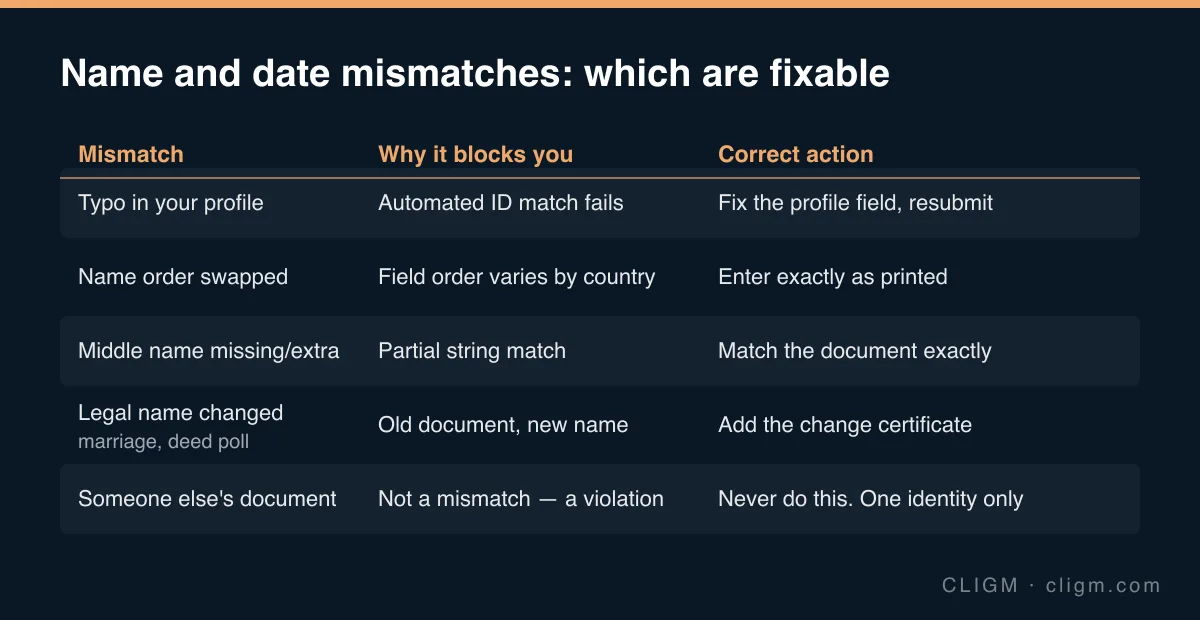
Plain typos. Read your profile fields character by character against the document. Fix, then resubmit. Whether the profile remains editable depends on how far verification has progressed — before verification completes it usually is; afterwards it generally is not.
Name order. Documents in different countries print given and family names in different orders, and some do not label which is which. Enter each name into the field it belongs in, according to the document — not according to how you would introduce yourself.
Missing or extra middle names. If the document prints a middle name, include it. If it does not, leave it out even if it is legally part of your name. The comparison is against the document, not against your birth certificate.
Transliteration. Where your document shows a name in a non-Latin script alongside a machine-readable Latin transliteration, use the Latin form exactly as the document renders it. The transliteration on your passport is the one that will be read, even if you normally spell your name differently in English.
Accents and special characters. Reproduce them as printed where the field accepts them. If the field rejects a character, use the form that appears in the document's machine-readable zone.
Date of birth. The usual cause is day/month order confusion between date formats. Check what the document actually prints before assuming.
Mismatches that need a support flow
If your legal name has genuinely changed — marriage, divorce, deed poll, gender recognition — you are not dealing with a data-entry error, and no combination of profile edits will resolve it cleanly on its own.
The correct path is to verify with a current identity document showing your current legal name, and to expect that you may be asked for the document evidencing the change, such as a marriage or name-change certificate. Handle it through official support rather than trying to make the old name work.
The same applies where verification already completed under your previous name and profile fields are now locked. Support has flows for this. Attempting to route around it by opening a second account creates a far worse problem.
The thing you must never do
Do not submit someone else's document because their name matches the profile, and do not adjust the profile to match a document belonging to a family member.
This is not a mismatch problem with a clever workaround — it is a different violation entirely. It will surface at the face check, which compares you against the document photo, and it can permanently cost the account and any balance in it. Accounts are for one identity. If the person whose document it is needs an account, they need their own.
Equally, do not edit a document image to make it match your profile. That converts a routine rejection into document falsification.
After you correct the fields
Resubmit once, cleanly, and let it run. Rapid repeat attempts restart the queue rather than speeding it up.
If the details now match and the status still sits still, that is a queue problem rather than a data problem — see KYC stuck on "under review". If you are unsure whether the rejection is text or image related, work through the document checklist first and eliminate capture quality.
CLIGM is an independent guide and is not affiliated with Binance. Verification requirements, accepted documents and available products differ by region and change over time — always confirm the current rules inside your own account or in official Binance support material. Last reviewed: August 2026.