Somewhere between "verified in three minutes" and "stuck for two weeks" lies every Binance KYC experience — and the difference is rarely luck. Verification time depends on which review queue your submission lands in, and that depends mostly on the quality and consistency of what you submit. This guide maps the normal timelines, the things that quietly move you into slower queues, and the point at which waiting stops being the right strategy.
One number matters more than any timeline: one. The number of times you should submit. Rapid resubmissions cancel your place in the review queue and start it again — the single most common way applicants turn a two-hour review into a two-week one.
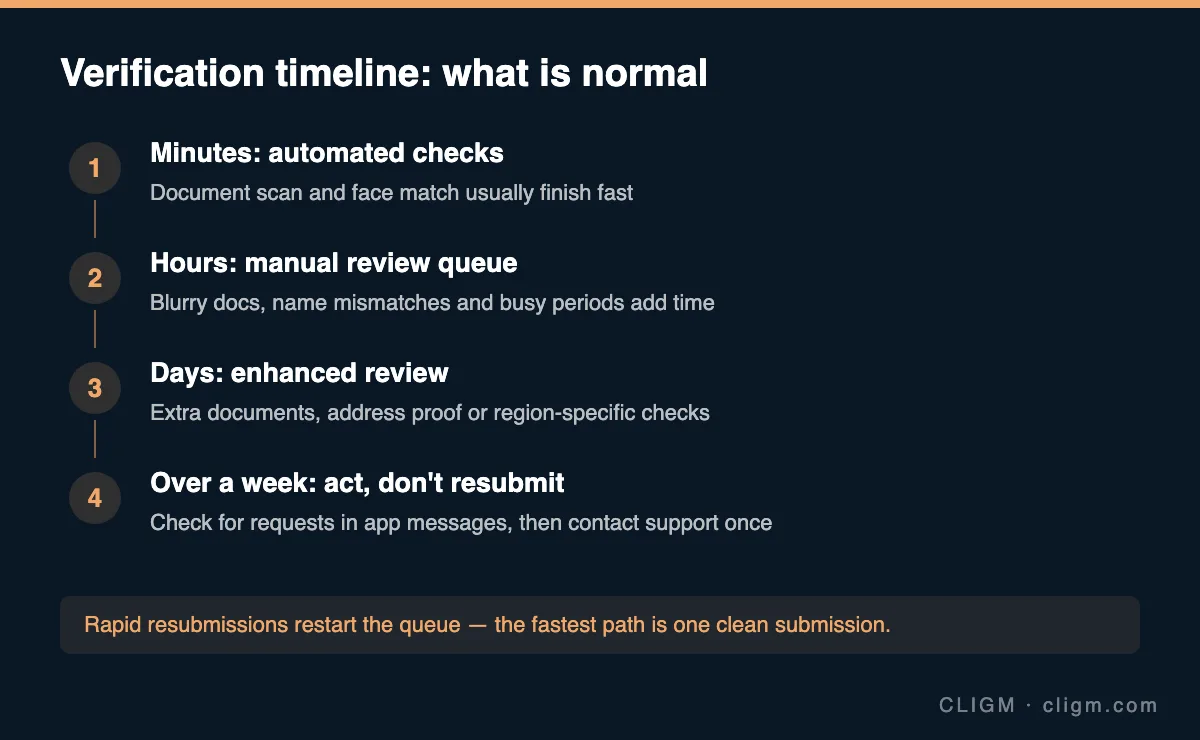
Minutes: the automated pass
Most straightforward verifications finish in minutes. Document scan, data extraction, face match against the document photo — all automated. You land here when everything is machine-readable on the first pass: a current government ID photographed flat with all four corners visible, no glare, no filters, and a face check done in even lighting by the document's actual owner.
If you have not submitted yet, this is the queue to aim for. The full pre-submission checklist — document condition, name formatting, lighting — is in why Binance verification fails, which is worth five minutes before your first attempt, not after your third.
Hours: the manual review queue
When the automated system is not confident, a human reviews the case. Common reasons you land here:
- Marginal image quality — readable but glared, slightly cropped, or low-resolution.
- Name mismatches — middle names present in one field and missing in another, transliteration differences, maiden names.
- Document quirks — less common document types, recently issued documents not yet in reference databases.
- Volume — market surges create signup waves, and review queues stretch with them. Evenings and weekends in your region can be slower.
Hours-long waits are normal here, sometimes stretching to a day. Nothing is wrong. The system will email you or update the app when done — refreshing the page does not move the queue, and resubmitting restarts it.
Days: enhanced review
Some cases need more than a document check: address verification, region-specific regulatory checks, source-of-funds questionnaires, or a second document because the first was inconclusive. You may get a request for additional materials — this arrives in the app or by email, so check your in-app messages daily while a verification is pending. An unanswered document request is the most common reason a "days" case silently becomes a "weeks" case: the review is not slow, it is waiting for you.
Days-long reviews are also normal after account changes: a new legal name, a new passport, a country move. Consistency between your old record and new documents gets checked manually, and that takes real time.
Over a week: stop waiting, start acting — carefully
Past the one-week mark with no status change and no document requests, do three things in order:
- Re-check messages — in-app notifications, the email you registered with, and its spam folder. Look specifically for requests you may have missed.
- Verify your submission went through — the verification page should show a pending state. An interrupted upload that never actually submitted looks identical to a slow review from the outside.
- Contact support once, through the official app or site, with your case details: when you submitted, document type, and the exact status shown. One complete ticket beats five fragmentary ones — duplicate tickets can merge queues badly and slow the response.
What not to do: withdraw the application and resubmit "to refresh it" (back of the queue), submit a different person's document out of frustration (account restriction — see account locked causes), or pay a third-party "KYC acceleration service" (scam, every time — nobody legitimate sells queue positions).
What verification level you actually need
While you wait, it is worth knowing what you are waiting for. Basic verified access covers most beginner activity: deposits, spot trading, standard withdrawals. Higher tiers mainly raise limits and unlock products like fiat channels or P2P in some regions. If your goal today is a small first deposit and some spot trades, the base verification is enough — there is no need to pursue every tier upfront, and limits are a separate topic covered in withdrawal limits explained.
The timeline in one table
| Elapsed time | Most likely state | Your move |
|---|---|---|
| Under 1 hour | Automated checks running | Nothing — keep the app installed |
| 1–24 hours | Manual review queue | Nothing — watch messages |
| 1–7 days | Enhanced review or document request | Check in-app messages daily, respond fast |
| Over 7 days | Stalled, lost, or waiting on you | Re-check messages, then one complete support ticket |
Most stuck verifications, in practice, are one of two things: a submission that failed to upload, or a document request sitting unread. Both are found in your messages, not in the queue.
CLIGM is an independent site and is not affiliated with Binance. Verification steps, tiers and review times vary by region and account and change over time — the status and requests inside your own account are authoritative. Last reviewed: July 27, 2026.