
Deposits & Withdrawals
Binance Deposit Missing? Diagnose It Before Contacting Support
Use the transaction status, network, deposit address, memo and minimum amount to diagnose why a crypto deposit is not showing in Binance.
A crypto deposit that has not appeared in your Binance account is stressful, but it is almost never mysterious. The funds are in one of a small number of places — still on the sending platform, in flight on-chain, arrived but waiting for confirmations, or delivered somewhere that needs a correction — and a few minutes of methodical checking will tell you which. This guide walks the diagnosis in the order that resolves the most cases fastest, and tells you exactly what to prepare if you do end up needing support.
Work through the steps in sequence. Each one either finds the money or eliminates a category of causes.
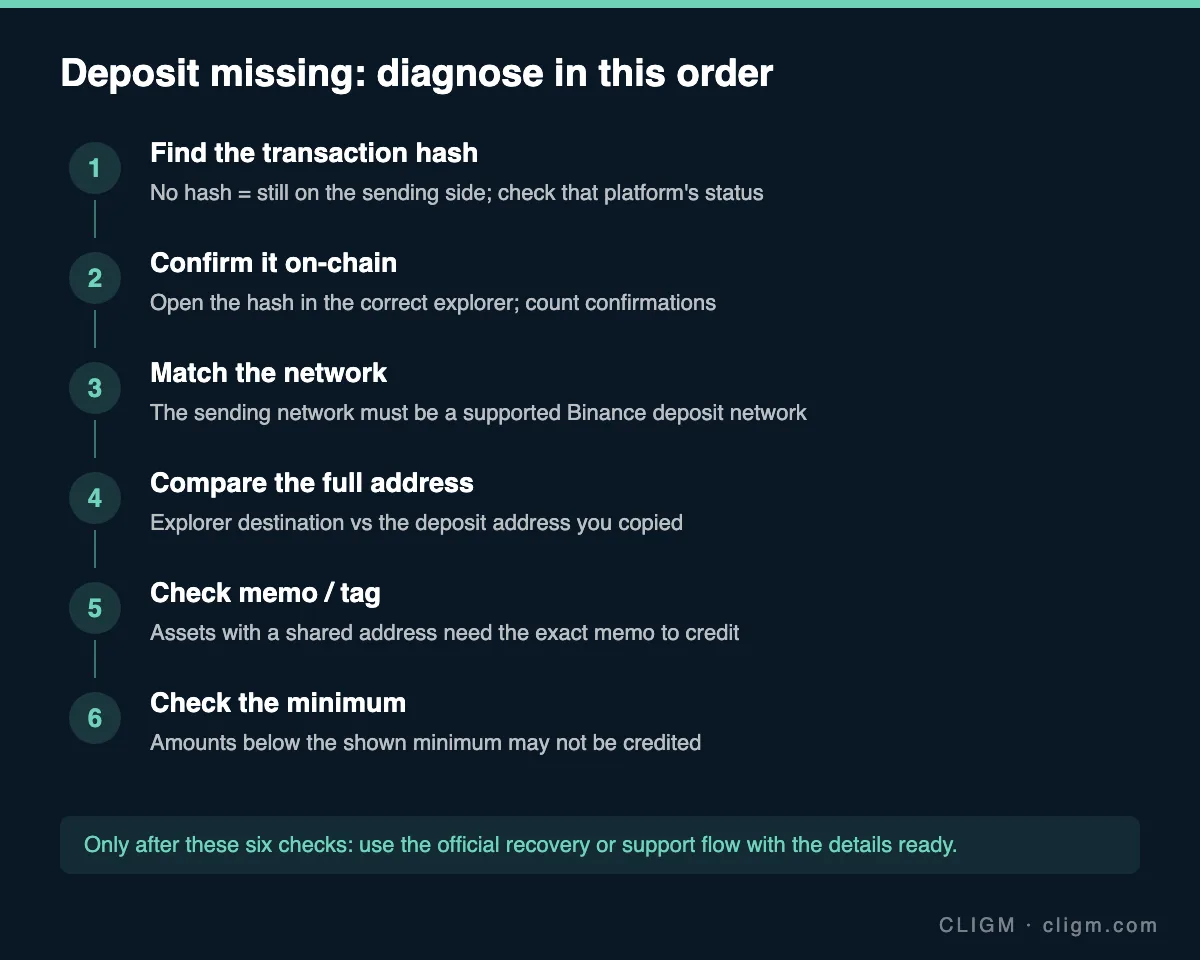
First determine whether the transfer exists on-chain
Find the transaction record on the sending exchange or wallet and look for a transaction ID or hash. This single detail splits the problem in half.
No hash yet? The withdrawal has not been broadcast to the blockchain — the issue is on the sending side, not Binance's. Statuses like "reviewing," "processing" or "awaiting approval" mean the sending platform is still running its internal checks. Wait out its displayed estimate, and contact that platform if the status does not progress. Nothing on the receiving side can change anything at this stage.
Hash available? Copy it and open it in the correct blockchain explorer for the network used. Type the explorer address yourself or use a bookmark — never follow an explorer link sent by a stranger, as fake explorers showing fake "stuck" transactions are a known scam setup for "recovery service" fraud.
In the explorer, check two things: whether the transaction succeeded (a failed or reverted transaction means funds never left) and how many confirmations it has. Binance credits deposits only after a network-specific number of confirmations; a transaction with two confirmations on a network requiring twelve is not missing, just early. Congested networks can stretch this stage.
Check the asset and network pair
If the transaction is confirmed on-chain but still absent from your account, open the Binance deposit page for that asset and compare networks. The network the transaction actually used — visible in the explorer — must be one that Binance supports for deposits of that asset. USDT on Ethereum (ERC20), on BNB Smart Chain (BEP20) and on TRON (TRC20) are three entirely different transfer routes behind one ticker, and the same is true for many assets.
If the networks do not match, stop making further transfers immediately. This is the moment to read our full guide on choosing the right network to understand what happened, then use only the official Binance recovery or support flow. Save every detail first: hash, asset, network, amount, addresses, timestamps. Wrong-network recovery is possible in some cases but discretionary, slow and not guaranteed.
Compare the destination address
Still matching so far? Compare the destination address shown in the explorer with the deposit address on your Binance deposit page — the full string, not just a glance. Start with the first and last several characters, then verify the middle. This comparison catches two distinct problems: a stale address (you used an old address from history that is no longer yours) and clipboard malware, which silently replaces a copied address with an attacker's.
If the funds went to an address that is not your Binance deposit address, be realistic about outcomes: whoever controls that address controls the funds. If it is another exchange's address (you mixed up tabs), contact that platform. If it is unknown, no legitimate service can reverse the transaction — and any "recovery agent" who promises otherwise, for an upfront fee, is running the second scam of your day.
Look for a missing memo or tag
Some assets and networks use a shared deposit address for all users plus a memo, destination tag or payment ID that routes funds to your specific account. If your Binance deposit page showed a memo and the sender omitted it — or entered it with a typo — the transfer arrives at Binance's address without arriving in your account.
This is one of the more recoverable scenarios, because the funds are at least inside the platform: use the official deposit-recovery flow and provide the hash, asset, network, amount, address and the memo that should have been used. Expect a manual process. Never post these details publicly alongside your account information.
Check minimums and special asset rules
Deposits below the minimum shown for that asset and network may not be credited at all. Check the stated minimum on the deposit page and compare against the amount actually sent — after the sending platform's withdrawal fee, which beginners often forget reduces the amount that arrives. Some tokens carry additional rules: a specific contract version, a temporarily suspended deposit status during a network upgrade, or an asset Binance has delisted for deposits. The deposit page and official announcements are the authority for these cases.
Build a clean support packet
If all checks pass and the deposit still has not arrived after the expected confirmations, contact support — through the official app or website only. You will resolve the case dramatically faster with a complete packet prepared: transaction hash, asset and network, amount, sending platform, destination address, memo if applicable, timestamps and a screenshot of the explorer status. State the facts in order, without theories.
While the ticket is open, ignore anyone who contacts you claiming to be support — real agents work inside the ticket, and "support" that reaches out first on Telegram or WhatsApp is a scam without exception. If your situation involves a withdrawal from Binance rather than a deposit into it, the diagnostic logic differs slightly; see withdrawal pending or suspended for that direction.
Prevent the next missing deposit
Every cause above has a cheap prevention: copy the address and network together from the current deposit screen, include the memo when shown, respect minimums, and send a small test amount first whenever the sum matters. The full pre-transfer routine — seven checks, under a minute — is in our network guide. Deposits become boring when the checks become habit, and boring is exactly what you want your transfers to be.
CLIGM is an independent publication, not affiliated with Binance. Confirmation counts, minimums and recovery policies vary by asset and change over time — the in-app deposit page is always the authority for your account. Last reviewed: July 27, 2026.