
Deposits & Withdrawals
BEP20 vs ERC20 vs TRC20: How to Choose the Right Network
A practical way to match deposit and withdrawal networks before moving USDT or other tokens between Binance, another exchange or a wallet.
Every "lost" crypto transfer story we hear starts the same way: the ticker matched, so the sender assumed the transfer would work. USDT was sent to a USDT address — what could go wrong? The answer is the network. The same token exists on multiple blockchains, and a transfer only arrives cleanly when the sending network and the receiving platform's supported network match. This guide gives you a rule, a mental model and a pre-flight checklist that together prevent essentially all network mistakes.
The rule that prevents most mistakes
Always start from the receiving side. Open the deposit page of the platform or wallet that will receive the funds, select the asset, and look at which networks it explicitly supports for deposits. Choose one of those networks, copy the address (and memo, if shown) from that same screen, and then use exactly that network on the sending side. Never choose the network on the sending side first and hope the receiver supports it — the sender cannot know what the receiver accepts.
This rule works because a blockchain transfer is not a payment to a company; it is a movement between addresses on one specific chain. If the receiving platform does not operate a wallet on that chain, the tokens end up at an address the platform may not control or monitor, and recovery ranges from slow to impossible.
Understand the three common choices
For USDT and many other tokens, three networks dominate the dropdown menus:
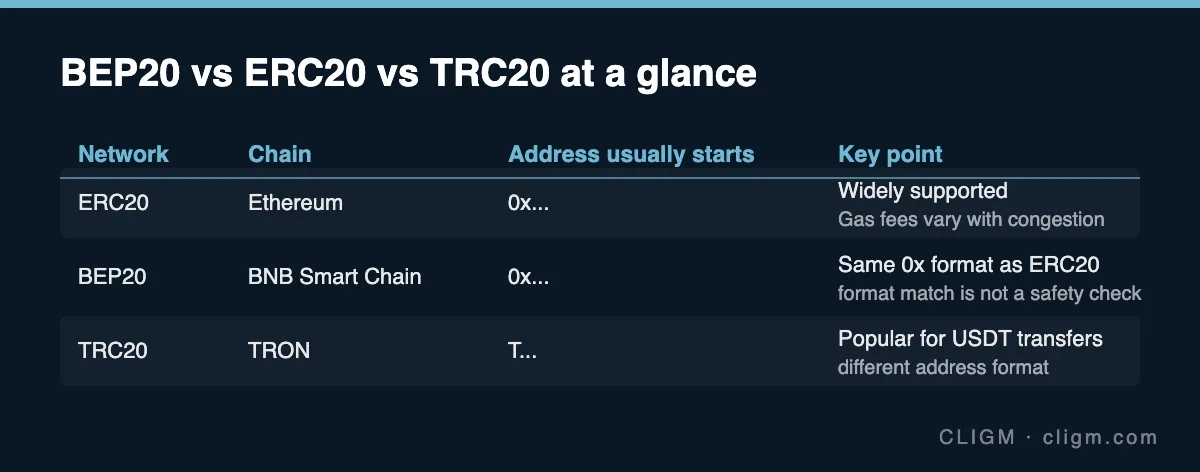
ERC20 means the token lives on Ethereum. It is the most widely supported standard across exchanges, wallets and DeFi applications, and its fees rise and fall with Ethereum congestion.
BEP20 means BNB Smart Chain. Fees are typically low, and — critically — its addresses use the same 0x... format as Ethereum. An ERC20 address and a BEP20 address can be visually identical.
TRC20 means TRON, whose addresses start with T. It is popular for USDT transfers because fees have historically been low, and its distinct address format at least prevents cross-format confusion with the other two.
The practical differences that matter to you are only these: which networks the receiver supports, what the withdrawal fee is on each, and whether you copied the address from the correct network's deposit screen. Speed differences between these networks are measured in seconds to minutes and rarely worth optimizing for.
Why an address can look valid and still be wrong
Because BEP20 and ERC20 share the 0x address format, a sending platform can happily validate a transfer of ERC20 USDT to an address you copied from a BEP20 deposit screen — the format checks out, the transaction confirms on-chain, and nothing arrives in your account. The blockchain did exactly what it was told; it was told the wrong thing.
This is why "the address looks right" is not a safety check. The only meaningful check is: address and network were both copied from the same deposit screen, and the sending side is set to that same network. Many wallets and exchanges now warn on obvious mismatches, but warnings vary by platform; do not outsource this check.
Memos add one more trap: some assets and some platforms use a shared deposit address plus a memo or tag to route funds to your specific account. If the deposit screen shows a memo, it is mandatory — a transfer without it arrives at the platform but not in your account, and needs a manual recovery process.
Seven checks before confirming
Run this list every time; it takes under a minute:
- The receiving platform's deposit page is open for the correct asset.
- The network you will send on appears in that page's supported list.
- The address was copied from that page just now — not from an old note, chat message or transaction history.
- The memo/tag, if the page shows one, is copied exactly.
- After pasting, the first and last characters of the address match what you copied (clipboard malware swaps addresses).
- The amount exceeds the receiver's minimum deposit for that asset and network.
- For any meaningful sum, a small test transfer goes first, and you confirm its arrival before sending the rest.
Step 7 feels wasteful right up until the day it saves you. Two transfers with two small fees are cheap; one unrecoverable transfer is not.
If you already selected the wrong network
Stop making further transfers and diagnose calmly. Find the transaction hash on the sending side and check its status in the correct blockchain explorer for the network actually used. Then the outcomes fork:
If the receiving platform supports the network you accidentally used (you just copied the address from the wrong tab), the funds may simply arrive, or arrive after a delay — check the deposit history first. Our guide to diagnosing a missing deposit walks through this in order.
If the receiving platform does not support that network, you will need the platform's official recovery flow. Prepare the transaction hash, asset, network, amount, address and time, and submit through the official app or website only. Recovery for unsupported-network deposits is discretionary, can take a long time, may carry a fee, and is not guaranteed — which is exactly why the checklist above exists.
If the funds went to an address unrelated to any platform you use (a typo, a stale clipboard), the controller of that address controls the outcome. No support team can reverse a confirmed blockchain transaction.
Where this fits in the bigger picture
Network selection is one of three checks that make transfers boring and safe — the other two are understanding what each withdrawal actually costs, covered in Binance fees explained, and knowing how to read a withdrawal's status while it is in flight, covered in withdrawal pending or suspended. Together they turn "I hope it arrives" into a process you can verify at every step.
CLIGM is an independent publication, not affiliated with Binance or any network. Supported networks, fees and recovery policies vary by platform and change over time — the deposit and withdrawal screens in your app are always the authority. Last reviewed: July 27, 2026.